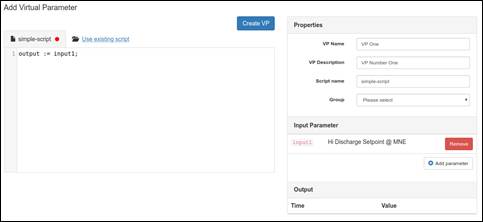
Creating a new virtual parameter is quite easy. There are three parts to creating a virtual parameter. We will go over them one by one.
1. Virtual Parameter Scripts
You can write a new script or use an existing script. Please see the guide on writing virtual parameter scripts to write a new script.
To use an existing script, simply click on “Use existing script” and choose the script that fits your need. Please see the guide on using an existing script for more details.
2. Virtual Parameter Properties
There are four required properties and they are explained below,
- VP Name – Identifier for your virtual parameter.
- VP Description – Description for your virtual parameter.
- Script Name – Identifier for your script. Once saved, you can reuse the script for a different virtual parameter by selecting “Use existing script“.
- Group – As an owner of the script, you can edit the script at later point in time. This Group property extends the edit permission to users in the group.
3. Input Parameter
The input parameter lets you expose existing OnPing parameters as an input to your script.
When you add a parameter, a variable name is assigned to it as inputX, where X is the index number. For example, based on the screenshot above, the variable name is input1.
Was this article helpful?
That’s Great!
Thank you for your feedback
Sorry! We couldn't be helpful
Thank you for your feedback
Feedback sent
We appreciate your effort and will try to fix the article