Enhancements
Portal
New Advanced Dispatch Board Feature - PILOT
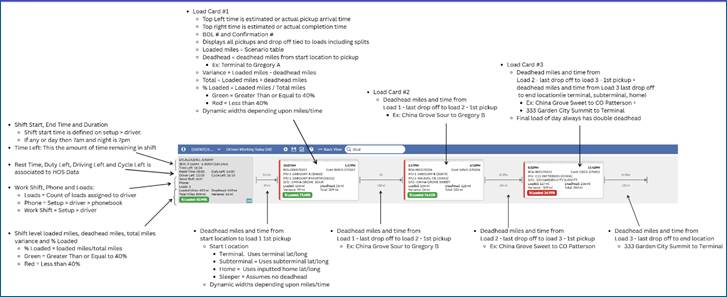
- The Advanced Dispatch Board view enables Dispatchers to see shift and load level loaded miles, deadhead miles, variances, % of loaded to total miles and estimated times. This will be a great tool for Dispatchers to identify inefficiencies in a driver's shift.
- This feature will go live on January 7th. If you would like to be a Pilot customer, please email support-transportation@pakenergy.com requesting access.
- When a driver's loads are added/removed/rearranged/rerouted, all the times and miles will automatically update.
- Times and miles will not automatically update if any of the following actions/scenarios are initiated (outlined below). This will be enhanced in a January build, so they automatically refresh times and miles.
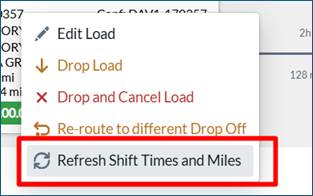
- Until the enhancement, a Dispatcher can right click on the driver card or any load card tied to driver's shift and click "Refresh Shift Time and Miles” to update the data.
- Below are actions, if taken will not automatically refresh times and miles.
- If a load shifts from yesterday to today, it doesn't recalculate them automatically. It retains stored info from the prior day.
- On Review, if a mass update or drop or drop and cancel load doesn't update times.
- Edit to driver's home location lat/long, a load's Pickup location Lat/Long or Drop Off location Lat/Long.
- Editing Setup > Pickup avg load time or Setup > Drop Off > avg unload time.
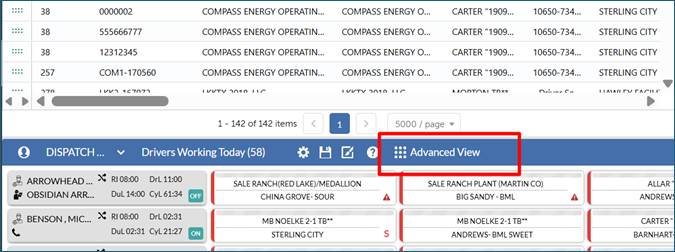
- On the Dispatch Board, In the drivers working today section, click the Advanced View:
- Detailed Guide of Advanced Dispatch Board (click picture for expanded view):
Link to exportable document is at the end of the Release Notes.
- Additional Filters, Search capability and display options have been added. In our January release, this will be enhanced so these changes can be stored in a profile.
- Under the settings gear icon, Dispatcher can alter how the Driver's Names are displayed in the Driver Card, can highlight all loads/drivers with high deadhead (< 40% loaded), show or hide miles, times and BOL/Confirmation # within the Load card.
- In the Search Driver or Load ID column, if a driver's name is input it will filter to only display this driver or if a BOL # is input it will filter to only display the driver with this BOL # assigned + highlight the load in yellow.
- A new drop-down menu option has been added to filter and display only loads with a particular status (i.e. assigned, ongoing, reject, complete).
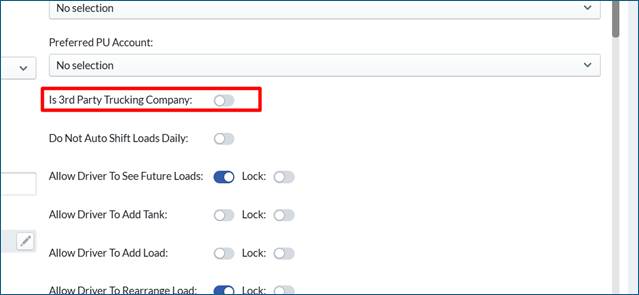
- On the Dispatch Board, if a driver is defined as Setup > Driver > Is 3rd Party Trucking Company then shift and load times and miles will not populate on advanced Dispatch Board
- On the Advanced Dispatch Board, the Driver Available grid is automatically hidden for speed improvements. In a January build, some of the filter options with the Driver Available grid will be added in the Drivers working today section.
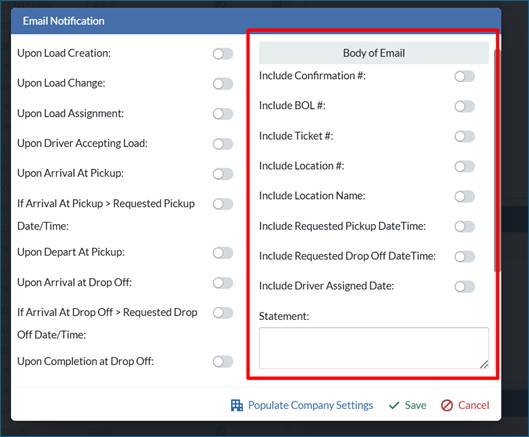
For all phonebook email and SMS notifications, the menu options of what can be added to the notification has been updated
Mobile
- NA
API
- NA
Bugs/Issues
- On Load > Creation new load screen, if Dispatcher is building multiple loads at once, when they copy and paste confirmation #s if the user didn't tab or click out of the last Confirmation # field it would auto generate a Confirmation #. This issue has been fixed.
Was this article helpful?
That’s Great!
Thank you for your feedback
Sorry! We couldn't be helpful
Thank you for your feedback
Feedback sent
We appreciate your effort and will try to fix the article