New Mobile App
Enhancements
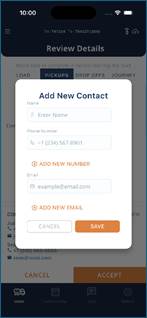
- When a driver is working on a load and they go to the DETAILS button, they now can add new contact info for the Pickups or Drop Offs associated to this load. Drivers can press Add New in the contact section and input the contacts name, up to 2 phone numbers and up to 2 email addresses. This information will be stored on the Setup > Locations > Pickup or Drop Off screen within the Phonebook.
Bugs/Issues
- When a driver is printing and, in some instances, when a driver would turn AUTO scale ON and then AUTO scale OFF and then back ON again it would not properly print the ticket and the format was incorrect. This issue has been resolved.
- On Setup > Account screen, if “Show Account Names on Run Ticket” is NO/disabled, it still printed the Account Name on the run ticket. This issue has been resolved.

- If a Driver is on Pickup or Drop Off screen and a portal user adds a Tank to a given location and driver clicks REFRESH, the new tank the portal user added does not appear. This issue has been resolved.
- When a driver takes a photo upon arrival or upon departure, in some instances the driver receives a blank screen. This issue has been resolved.
Was this article helpful?
That’s Great!
Thank you for your feedback
Sorry! We couldn't be helpful
Thank you for your feedback
Feedback sent
We appreciate your effort and will try to fix the article